
Contacts 2026
Paloleum appsCommunication
4.5259.00 Reviews
- Version
- 3.1
- Installs
- 500.00K
- Age Rating
- Everyone
Screenshots
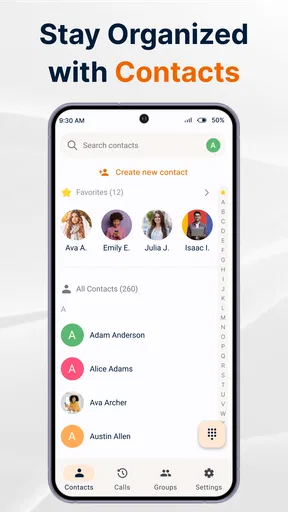
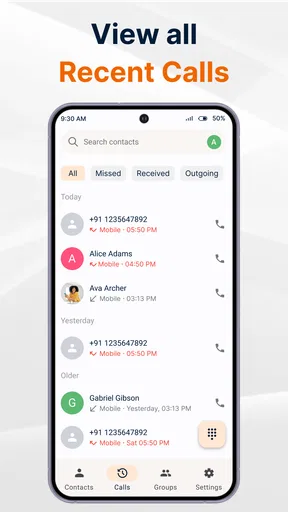
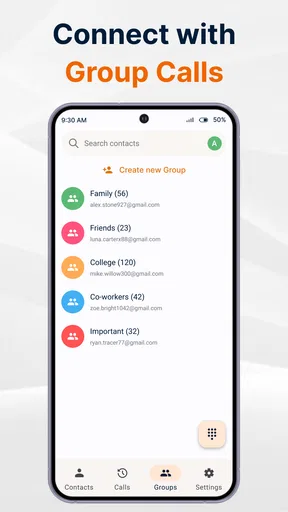
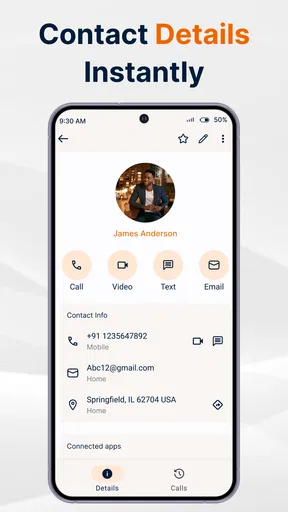
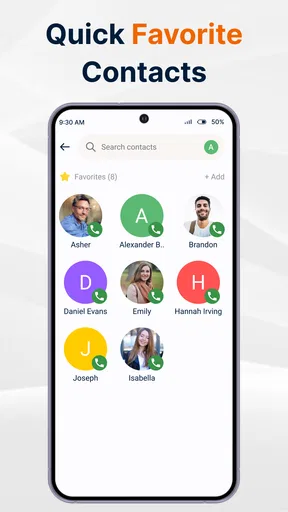
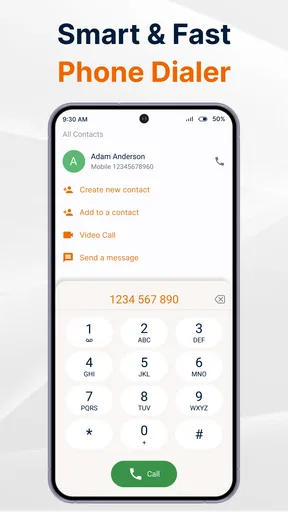
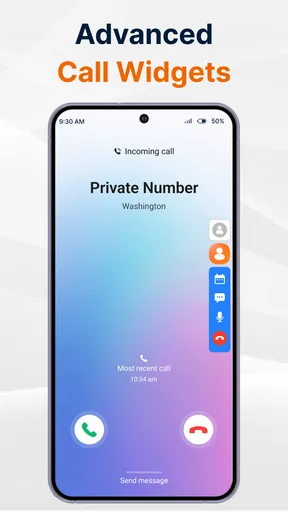
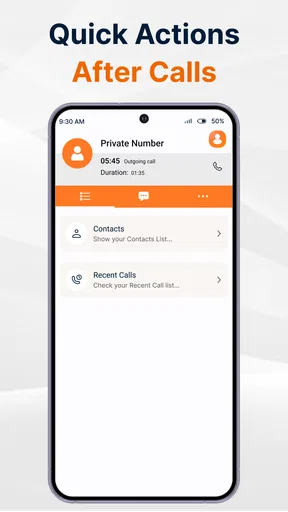
Our Review of Contacts 2026
 Analysis by Appyee
If you want a simpler way to reach people from one place, Contacts 2026 is worth a look. I tested it as a communication app from Paloleum apps, and its main appeal is easy to understand: it brings contacts, recent calls, caller identification, and dialing into one focused experience. It is free, rated for Everyone, and available for devices running Android 7.0 or later. That makes it approachable for a wide range of phones, especially if your current phone app feels cluttered or awkward.
My first impression was that this is not trying to replace every communication tool on your phone. It is not a messaging platform, a social network, or a full contact-management suite with a long list of unrelated extras. Its value is more practical. I can open it when I need to find somebody, check who recently called, identify an incoming number, or dial without moving through several separate screens.
The best reason to try it is the reduction of small everyday interruptions. When I am in a hurry, the difference between finding a person immediately and searching through a confusing call history matters more than a large collection of advanced options. Contacts 2026 is built around that kind of quick access.
What to expect before you make a call
Contacts 2026 is presented as a communication app, but I found it more useful to think of it as a front door for phone-related tasks. Contacts are the starting point, recent calls provide context, caller ID helps with unfamiliar numbers, and the dialer handles the direct action. These parts make sense together because most phone calls begin with one of the same questions: who do I want to call, who just called me, or who is calling now?
The app has reached over 500 thousand installs and holds an average rating of 4.2 from around 3 thousand ratings. Those figures suggest that it has found an audience beyond a small group of testers, although they do not guarantee that every phone will feel identical. Contact access and call history depend heavily on how a particular Android device organizes its own phone data.
I also noticed that the short identity of the app is simply “Contacts 2026,” while its broader purpose is clearer when you use it: it combines contact access, recent calls, caller ID, and dialing. That distinction is useful because someone expecting a replacement for a messaging app may be disappointed. Someone wanting a more direct calling workspace is much closer to the intended audience.
On a busy day, the practical benefit is easy to imagine. Suppose I receive a call while carrying groceries. Instead of remembering the number, opening a separate contact tool, and then returning to the phone screen, I can use the recent-call view to identify the entry and decide whether to call back. If the number is unfamiliar, caller ID can provide another clue before I answer or return the call.
That workflow is especially helpful for people who make many ordinary voice calls: families coordinating plans, small business owners, delivery workers, older relatives, or anyone who prefers calling over typing. It is less compelling for someone who communicates almost entirely through chat apps and rarely uses the phone dialer.
How I approached the first setup
After installing the app, I would begin with the simplest goal rather than exploring every screen. The first meaningful test is finding one familiar contact and starting a call. That gives the app a clear job and makes it easier to notice whether contact access and dialing behave as expected on the device.
Because the app works with contacts and recent calls, the setup experience naturally depends on granting access to the relevant phone information when Android asks for it. I recommend reading each permission prompt instead of approving everything automatically. If you want contact lookup and recent-call context to work, the app needs the appropriate access; if you do not want to use a particular part, you can make that decision deliberately rather than treating setup as a race.
A useful first step is to check whether the people you call most often appear with the names and numbers you recognize. This is not just a cosmetic check. Duplicate entries, old numbers, and contacts saved under different labels can make any contact app feel unreliable. If something looks wrong, I would correct the contact itself before blaming the interface.
Another small habit helps: keep the app’s role clear in your mind. Contacts 2026 gives you a convenient way to access phone information, but it does not magically clean up every problem in your address book. If your contacts are disorganized, the app may expose that mess more clearly. That can be useful, but it means the quality of the result depends partly on the phone’s existing contact records.
The developer is Paloleum apps, and the current version is 2.6. Since the app is relatively new, having a current version matters more than relying on an old installation package. I would install it through the normal store route, complete one basic call, and then decide whether its layout feels natural enough for daily use.
The first successful action matters more than browsing
For me, the first success would be locating a known person without manually scrolling through a long list, opening that contact, and dialing from the same flow. That simple sequence tests the central promise better than spending time looking at settings. If it feels quick and predictable, the app has already earned a place in my routine.
There is a practical trick here: use a contact whose name is easy to recognize but whose entry is not necessarily near the top of your existing list. That tests search and navigation rather than memory. Then repeat the process from the recent-call area with a number you have actually used. The two tests reveal whether the app is useful both when you know whom you want and when you are working backward from a previous call.
Caller ID is another feature I would evaluate in a calm moment, not during an urgent call. An unfamiliar number creates pressure, and that is when people are most likely to misread information or answer without thinking. Try observing how the app presents an unknown caller and whether the result gives you enough context to make a decision. The important benefit is not merely seeing a label; it is having a little more information before choosing to respond.
I would also avoid treating caller ID as proof that every number is safe or correctly identified. Identification can be helpful, but it should support judgment rather than replace it. If a call asks for sensitive information, I would still verify the person or organization through a trusted channel. This is one of the most important real-world limitations of any caller-identification feature.
For frequent callers, the app can become a small routine. I might open it before leaving home, check whether I missed a call, return one important number, and then close it. That is a more realistic benefit than expecting a dramatic change to how I communicate. The app saves attention in short bursts, which is exactly where a focused dialer can be valuable.
Common points of confusion
The first possible confusion is the difference between contacts and recent calls. A contact is a saved person or organization; a recent call is an event in your call history. They may point to the same individual, but they are not interchangeable. If a number appears in recent calls without a familiar name, that does not necessarily mean the app failed to find it. It may simply not be saved in your contacts.
That distinction suggests a useful workflow. When you recognize an unfamiliar recent number, decide whether it deserves a saved contact entry. If it does, save it with a clear name and perhaps a useful note in your phone’s normal contact system. The next time it appears, the app has better information to work with. This turns occasional call history into a more organized address book over time.
A second source of confusion is expecting the dialer to behave exactly like the manufacturer’s default phone app. Android phones vary in navigation, call controls, and system integration. Even when the basic action is the same, buttons may feel different or appear in another order. I would give myself a few test calls before making it the main way I place calls.
There is also a privacy consideration that should not be brushed aside. An app that works with contacts and call activity handles information that is personal and sometimes sensitive. I would install it only if I am comfortable with that type of access and would review the phone’s permission controls periodically. This is not a reason to reject Contacts 2026 automatically, but it is a reason to use it intentionally.
Another limitation is scope. If you need deep contact cleanup, cloud synchronization across several ecosystems, group messaging, video calls, or a unified inbox for many services, this is probably not the right primary tool. A full-featured phone suite or the built-in apps may serve those needs better. Contacts 2026 makes more sense when the problem is quick access to calling functions, not when the problem is managing every form of communication.
I would also be cautious about judging the app from one unusual number. Caller identification can be affected by incomplete contact information, unfamiliar businesses, recycled numbers, or the way a phone network presents a call. A result that seems unhelpful does not automatically mean the entire app is poor. Test it across ordinary contacts, recent calls, and a few unknown numbers before deciding.
Where it fits beside the usual alternatives
The default phone app remains the strongest alternative for many people. It is already installed, usually understands the device’s calling system well, and may be tightly connected to the manufacturer’s contacts and call history. If your current dialer is fast, clear, and reliable, switching may not produce enough benefit to justify changing habits.
Contacts 2026 becomes more attractive when the standard experience feels scattered. If you regularly jump between a contact list, call history, and a separate dialer, bringing those tasks into one app can feel more coherent. The trade-off is that a dedicated alternative may require a short adjustment period and may not match every system-level behavior of the built-in option.
Messaging apps are a different comparison. They are better when the conversation needs photos, documents, group replies, or an ongoing written record. Contacts 2026 is better for the moment when you simply need to reach a person by phone or understand a call that just arrived. I would not choose one instead of the other; I would choose based on whether the task is a voice call or a richer conversation.
For a first-time user, the decision is straightforward. Try Contacts 2026 if your priority is a clean path from person to call, or from recent number to callback. Skip it if you rarely make voice calls, if your existing phone app already does everything comfortably, or if you require advanced communication features outside contacts and dialing.
My practical routine after the first day
Once the basic setup works, I would use the app in three deliberate ways. First, I would search for a contact instead of scrolling through the entire address book. Second, I would review recent calls before returning an unfamiliar number. Third, I would use caller identification as a prompt to pause and assess, not as an automatic trust signal.
One non-obvious advantage of this routine is that it separates intention from reaction. Searching contacts handles calls I planned to make. Recent calls handle follow-up. Caller ID handles incoming uncertainty. Keeping those situations distinct reduces the chance of calling the wrong person or responding too quickly to a number I do not recognize.
I would also keep a small list of contacts that matter most and make sure their names are consistent. For example, using “Alex - work” and “Alex - personal” is more useful than having two entries with nearly identical names. The app cannot make that decision for me, but its quick-access purpose makes good naming more valuable because I am likely to act on the first result I see.
Families may find the app useful for a different reason. A relative who is uncomfortable with a complicated phone layout may appreciate having contacts, call history, caller ID, and dialing presented as connected tasks. The Everyone age rating also makes it broadly approachable, although ease of use still depends on the individual’s vision, familiarity with Android, and comfort with permission prompts.
On the other hand, I would not recommend making it the only way to handle important calls until it has been tested on the specific phone. Place a normal call, receive one, check a recent entry, and confirm that returning a call feels dependable. This takes only a few minutes and is more informative than relying on screenshots or ratings alone.
Contacts 2026 is free, which removes the financial barrier to trying it. That does not remove the cost of changing habits, so I would keep the test focused. If it makes ordinary calling noticeably easier after a few days, keep it. If I still reach for the default phone app every time, there is little reason to force the switch.
Paloleum apps has kept the concept focused enough that the app is easy to explain to a friend: it is a place to reach contacts, review recent calls, identify callers, and dial. The current version, 2.6, gives the product a clear starting point, while its support for Android 7.0 or later means many older devices can try it as well.
My final view is positive but measured. Contacts 2026 is most useful as a focused calling companion, not as a replacement for every communication tool. I would recommend it to someone who wants less friction when moving from a name or number to a call, especially if the standard phone experience feels disjointed. I would point a heavy messaging user, a person seeking advanced contact administration, or anyone already satisfied with the built-in dialer toward a different option.
For a first-time user, the safest path is simple: install it, allow only the access needed for the functions you plan to use, find one familiar contact, make a test call, inspect a recent call, and then try caller identification with sensible caution. If those steps feel natural on your phone, the app has probably solved the problem it is designed to solve. If they do not, its free price makes it easy to move back to your usual calling tool without much risk.
Privacy and Permissions
See what permissions an app requests and how it handles your data.
- Contacts
- read your contacts, modify your contacts
- Phone
- directly call phone numbers, read call log, read phone status and identity
- Device ID & call information
- read phone status and identity
- Other
- view network connections, read battery statistics, full network access, change your audio settings, run at startup, draw over other apps, control vibration, prevent device from sleeping, Google Play license check
Verdict
Strengths of Contacts 2026
- Quickly organizes contacts with a clean, familiar interface.
- Useful search tools help locate saved numbers in seconds.
- Supports contact grouping for easier personal and work management.
- Makes duplicate or outdated entries easier to identify.
- Convenient for keeping important contact details together.
Limitations of Contacts 2026
- Some features may require permissions to access your contact list.
- Advanced tools can vary depending on your device and Android version.
- Contact changes may not sync automatically across all platforms.
- The interface may feel basic for users wanting extensive customization.
- Backup options may be limited without an external sync service.
Similar Picks in This Category
View All
Google Messages
Google LLC4.6

Gmail
Google LLC4.1

Google Meet
Google LLC4.4

Google Chrome
Google LLC4.1

WhatsApp Messenger
WhatsApp LLC4.6

Carrier Services
Google LLC4.2
Frequently Asked Questions
What is Contacts 2026, and what can I use it for?
Contacts 2026 is a contact-management application designed to help you organize, search, edit, and maintain the people saved on your smartphone. It can be useful for users who want a cleaner address book, faster access to frequently contacted people, and better control over duplicate or outdated entries. Before downloading, check the app’s exact feature list and compatibility with your Android or iOS version.
Does Contacts 2026 require access to my contacts and personal information?
Yes, a contacts application normally needs permission to read and sometimes modify your address book so it can display names, phone numbers, email addresses, and other saved details. Review the permission request carefully before accepting it. You should also read the developer’s privacy policy to understand whether contact data remains on your device or is processed, synchronized, or shared through online services.
Can Contacts 2026 remove duplicate contacts or help clean up my address book?
Contacts 2026 may provide tools for identifying, merging, editing, or deleting duplicate entries, depending on the version and platform you install. These functions can save time when your address book contains repeated names or outdated numbers. However, create a backup before performing bulk changes, because merging or deleting contacts may be difficult to reverse if the application does not offer a reliable undo option.
Is Contacts 2026 free to download, or does it include in-app purchases?
The download may be free, but some contact-management applications reserve advanced tools for a premium plan, subscription, or one-time purchase. Features such as unlimited cleanup, cloud synchronization, backup, themes, or caller-related functions may have separate costs. Check the official store listing for the current pricing, advertisements, trial conditions, and renewal terms before confirming any payment.
Will Contacts 2026 work with my phone’s existing contacts and backups?
Compatibility can depend on your device, operating-system version, account settings, and the way your contacts are stored. Contacts saved through Google, iCloud, a SIM card, or another account may appear differently inside the app. Confirm that Contacts 2026 supports your phone and preferred synchronization method, and back up your address book before importing, syncing, or reorganizing contacts.
